Xiaomi Mi Auto-Empty Station Accessory for 2 Ultra Robot Vacuum Cleaner & Mop—
Product Code: BHR5196EU
Shopping on Yuppiechef is safe and secure

Scan the QR code to open this page on your mobile phone.
Product info
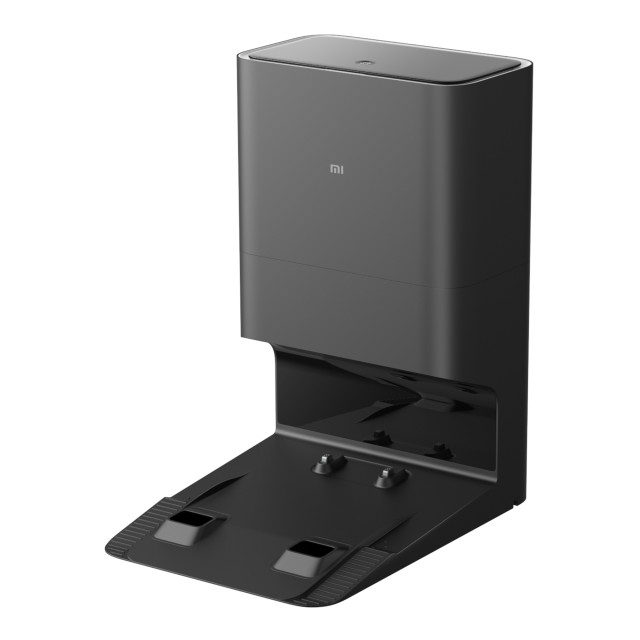
The Xiaomi Auto-Empty Station is the perfect companion for your Xiaomi Mi 2 Ultra Robot Vacuum & Mop — it automatically removes excess dirt when your mop tank fills up and empties the dust tank in 10 seconds. And the cherry on top? It charges while it empties the 2 Ultra.
- Used as an auto-emptying station for when your vacuum mop's dust and dirt chambers reach capacity during a cleaning session
- Automatically removes the excess dirt from your Vacuum Cleaner & Mop
- Features high-speed 16500Pa rapid dust collection, suction, a blowing cycle design and real-time monitoring of the air duct pressure
- Can empty the dust bag within 10 seconds
- Fitted with a 4L large capacity antibacterial dust bag which can be removed for emptying and has an extra one
- For additional convenience, the Mop 2 Ultra can also be charged while emptying
What's in the box
- 1 x Xiaomi Auto-Empty Station
- 1 x Power Cable
- 2 x 4L Dust Bag (1 already installed)
- 1 x 400ml Dust Box
- 1 x User Manual
About Xiaomi
Founded in 2010 by Lei Jun — who believes that high-quality technology doesn’t need to cost a fortune — Xiaomi creates remarkable hardware and software for, and with, the help of their fans as they incorporate customer feedback into their product range, which includes a collection of smart home devices and accessories.
Product specifications
- Power: 1000W
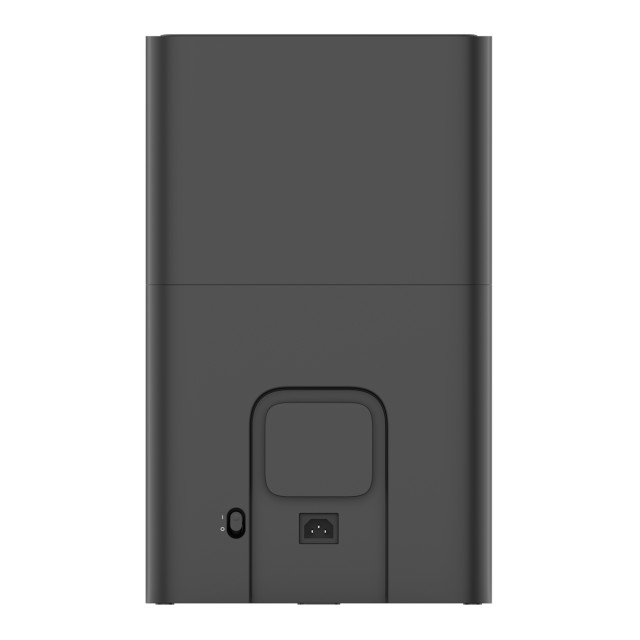
- Input: 220-240V-50/60HZ
- Output: 19.8V-1A
- Dimensions: 28.5cm W x 39.7cm H x 46.8cm D
- Weight: 7.5kg
- Compatibility: Xiaomi Mi 2 Ultra Robot Vacuum & Mop
- Uses a power cable
Key features
| Product SKU code: | BHR5196EU |
|---|---|
| Product barcode: | 6934177746536 |
| Product condition: | New |
| Power connection: | Corded |
| Warranty: | 6 Months |
Note: Some images are shown to illustrate scale, usage or features of the product, and may not be of the specific variant selected.
Care instructions
- Weekly cleaning recommended
- Open the top cover of the vacuum mop and press the dust compartment release button to remove the auto-empty dust compartment upwards
- Open the dust compartment and empty its contents, and then wipe the auto-empty vents clean with a cloth
- To prevent the filter from becoming clogged, lightly tap the dust compartment when emptying its contents
- Add clean water to the dust compartment, and close the dust compartment cover
- Shake the compartment back and forth and pour out the water
- For the filter, biweekly cleaning is recommended
- Only clean water should be used to clean the filter — do not use detergent
- Remove the filter, rinse, lightly tap on the edge of the filter to remove dust and debris
- Do not attempt to clean the filter with a brush or finger
- The filter must be fully dry before using it again
- Replacing the disposable bag
- When the disposable bag needs to be replaced, the indicator on the auto-empty station will blink
- Open the top cover of the auto-empty station, pull the handle upwards to remove it, and then discard the disposable bag
- Pulling upwards on the handle will seal the disposable bag to prevent the dust and debris from accidentally falling out
- Remove the dust and debris from the filter with a dry cloth
- Cleaning the air duct on the auto-empty station as needed
- If the air duct is blocked, follow the steps below to clean it
- Unscrew the air duct cover to remove it
- Check whether the air duct is blocked by foreign objects and remove the objects if necessary
- Install the air duct cover back and screw it in
- Clean the charging contacts and the auto-empty vents with a soft, dry cloth
- Make sure the auto-empty station is turned off and unplugged before cleaning
Warranty
This product comes with a 6-month warranty.
Shipping & returns
Delivery
This product qualifies for free delivery to your door. But you can choose from a number of delivery options.
- Delivery by courier to your door — free for orders over R700
- Collect from a Yuppiechef store — free
- Collect from your nearest PostNet — free for orders over R700
- How long will my order take to arrive?
- Can I send my order as a gift?
